

Description
What This Laptop Is
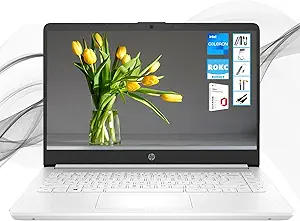
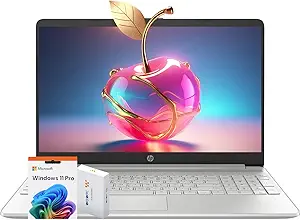
This is a budget 15.6 inch Windows laptop built around an Intel Celeron N4120 processor, sold with 8GB of DDR4 memory, a 512GB PCIe NVMe M.2 solid state drive and Windows 11 Pro. The listing is a reseller configuration rather than a standard HP retail model, which is visible in the details: the item model number is simply Laptop, the title begins with HP Latest, and a third party recovery USB drive is included as an accessory.
It belongs to the most basic tier of Windows notebook, aimed at browsing, streaming, email, documents and school work. The Celeron N4120 is an entry level processor, and that shapes every expectation about the machine. Buyers comparing at a similar price point should look at the Acer Aspire 3 and the Lenovo IdeaPad, and anyone whose work is entirely web based should also consider a Chromebook such as the Lenovo IdeaPad Slim 3 Chromebook, which uses the same class of hardware more efficiently.
Processor, Memory And Storage
The listing describes the Intel Celeron N4120 as having 4 cores and 4 threads with a burst speed of up to 2.6 GHz, and positions it for browsing, streaming and light productivity. The word burst is doing real work in that sentence: it is a short term peak rather than a sustained clock, and on a low power processor the difference between the two is significant. Graphics are Intel UHD Graphics integrated into the processor.
Memory is 8GB of DDR4, which is a workable amount for Windows 11 with a moderate number of browser tabs. The description separately mentions up to 32GB DDR4 RAM, which is the platform ceiling rather than the installed amount. Storage is the strongest part of the configuration: a 512GB PCIe NVMe M.2 SSD is generous at this price and is the single upgrade that most improves how a budget laptop feels day to day, because it removes the disk as the bottleneck even when the processor is slow.
The Display
The panel is 15.6 inches at 1366 by 768, described as HD with a micro edge design and an anti glare surface, rated at 220 nits and 45 percent NTSC. Those numbers should be read plainly. A 1366 by 768 panel on a 15.6 inch screen is a low pixel density, so text is noticeably coarser than on a 1080p display of the same size, and there is less room for two windows side by side. At 220 nits it is dim outdoors and near a window, and 45 percent NTSC is a narrow color gamut. The panel type is not stated, so whether it is IPS or TN cannot be determined from this page.
Ports, And One Real Limitation
The port list is reasonable for the price: one USB Type-C at a 5Gbps signaling rate, two USB Type-A at 5Gbps, a multi format SD media card reader, one HDMI 1.4b output, a combined headphone and microphone jack and a barrel power connector. Audio is dual speakers and the webcam is an HP True Vision 720p unit with integrated dual array digital microphones. The keyboard is full size with a numeric keypad.
One line in the specification deserves emphasis because it is easy to miss and it matters. The listing states that the USB Type-C port supports data transfer only and does not support charging or external monitors. That means no single cable USB-C docking, no charging from a USB-C power bank or phone charger, and no display output through that port. External monitors have to use the HDMI 1.4b output, and charging has to use the supplied barrel connector. Anyone buying a laptop in 2025 expecting USB-C charging should read that line twice.
Highlights
- Intel Celeron N4120 with 4 cores and 4 threads.
- 8GB DDR4 memory with a stated 32GB platform ceiling.
- 512GB PCIe NVMe M.2 SSD.
- 15.6 inch anti glare micro edge panel.
- Full size keyboard with numeric keypad.
- HDMI 1.4b output and an SD card reader.
- 720p webcam with dual array microphones.
- Windows 11 Pro rather than Home.
- Listed from 3 pounds and 0.7 inches thick.
Things To Consider
There is a data problem on this listing that buyers should know about. The specification table gives the ASIN as B0DVVRVXS3, while the product links elsewhere on the same page reference B0DVVRSX3B. Those are two different identifiers on one product page, and where a listing cannot agree with itself on which item it is, the safe step is to confirm the exact configuration with the seller before ordering. The table also lists an item weight of 6 pounds against a description figure of 3 pounds, and gives the processor as 2.6 celeron, which is the burst clock in the wrong field.
- The USB Type-C port does not charge the laptop and does not drive a monitor.
- A 1366 by 768 panel is low resolution for a 15.6 inch screen.
- 220 nits and 45 percent NTSC make the display dim and limited in color.
- Panel type is not stated, so viewing angles cannot be assessed.
- The Celeron N4120 is an entry level processor and will feel slow under load.
- Wireless is listed as 802.11ac in the specification table with no Wi-Fi 6 support stated.
- Battery capacity and rated runtime are not published anywhere on the listing.
- Two different ASINs appear on the same product page.
Who Should Buy It And Who Should Not
This laptop suits a light user who needs a Windows machine with a real keyboard and numeric keypad for documents, email, video calls and streaming, and who values the 512GB SSD and Windows 11 Pro at this price. As a second machine, a school laptop or a spare for travel where loss or damage would not be a disaster, it makes sense. Compared against other entry level 15 inch machines in the traditional laptops category, the storage capacity is the standout.
It is the wrong laptop for anyone doing sustained work, photo editing, or anything that needs a sharp bright screen. It is also the wrong choice for anyone who expects USB-C charging or a USB-C monitor connection, neither of which this machine supports. Buyers who can stretch further should compare the HP Essential 255 G10 with its Ryzen processor or the Acer Aspire 3, both of which offer more processing headroom.