

Description
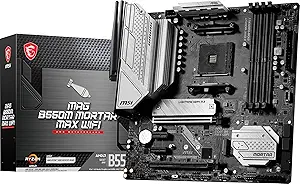
The MSI MAG B550M Mortar MAX WiFi is a Micro ATX motherboard for AMD’s AM4 socket, built on the B550 chipset. MSI lists it for AMD Ryzen 5000 Series processors with DDR4 memory, PCIe 4.0, SATA 6Gb/s, M.2 storage, USB 3.2 Gen 2, HDMI and DisplayPort outputs, Wi-Fi 6E, Bluetooth 5.2 and 2.5 Gbps wired networking. The MAX suffix indicates a refreshed revision of the earlier Mortar board, and this listing dates to September 2023.
Compatibility First
Every motherboard decision starts with what will physically and electrically fit, so here is what this listing states outright.
The socket is AMD AM4. The chipset is B550. The form factor is Micro ATX, and the listed 9.6 x 9.6 inch dimension matches the Micro ATX standard exactly, so that figure describes the board rather than the box. Memory is DDR4, which is not interchangeable with DDR5 in either direction. Expansion runs at PCIe 4.0.
MSI names AMD Ryzen 5000 Series processors in the product title. The listing does not enumerate support for other AM4 generations and says nothing about BIOS versions, so if you are pairing this board with anything other than a Ryzen 5000 Series chip, check MSI’s own CPU support list for this exact model and note the BIOS revision it requires. On AM4 in particular, processor support across generations is a firmware question as much as a socket question, and the product title is not a substitute for the support list.
One thing to be clear about: AM4 is the previous generation AMD socket. It takes DDR4 memory and it is not upgradeable to current Ryzen 9000 Series processors, which use AM5. That is not a fault, it is the platform, and it is the reason boards like this one remain attractive for builds reusing existing DDR4 memory or an existing AM4 processor. If you are starting from nothing, the newer socket is worth pricing out too; the ASUS ROG Strix X870-A Gaming WiFi shows what the AM5 side looks like.
What B550 Gives You
B550 is the mainstream chipset of its generation, sitting below X570. The practical difference is in high speed lane allocation. B550 provides PCIe 4.0 from the processor to the primary graphics slot and to one M.2 slot, while the chipset’s own downstream lanes run at PCIe 3.0. For a single graphics card and a single fast NVMe drive, that is the arrangement most builds actually use, and the difference from the higher tier chipset only shows up in configurations with several PCIe 4.0 devices at once.
The listing states M.2 storage and SATA 6Gb/s support without giving counts. As on most boards, populating certain M.2 slots can disable SATA ports, and the allocation table is in the manual rather than on the product page. If you are planning several drives, read that table before ordering them.
HDMI and DisplayPort outputs are listed. Those are only useful with a processor that includes integrated graphics, which many Ryzen desktop parts do not. If your processor has no integrated graphics, a discrete graphics card is required for any display output at all, regardless of the connectors on the rear panel.
Networking, Memory and Cooling
The networking specification is the standout feature at this tier. Wi-Fi 6E adds the 6 GHz band, which is less congested than 2.4 GHz and 5 GHz because fewer devices can use it, and it needs a Wi-Fi 6E capable router to deliver anything. Bluetooth 5.2 covers peripherals. On the wired side, 2.5 Gbps LAN is a genuine step above the gigabit port still common at this price, though it likewise requires a 2.5 Gbps capable switch or router at the other end to matter. Note that the imported specification block lists the wireless type only as “Bluetooth”, which understates what the board has; the product title is the fuller statement.
The specification block lists a DDR4 memory speed of 4400 MHz. Read that as an overclocked ceiling rather than a standard operating speed. DDR4 JEDEC speeds top out well below that figure, and reaching a high number depends on the memory kit, the processor’s memory controller and the exact module configuration. Check MSI’s memory qualified vendor list for this board before buying a kit specifically for its rated speed.
MSI describes the MAG series as built for durability with a straightforward installation process and an accessible firmware interface, aimed at entry level builders. That is the company’s own positioning. The listing does not quantify the power delivery arrangement or the heatsink coverage, so this page makes no claim about sustained overclocking headroom.
Highlights
- AMD AM4 socket with the B550 chipset in a 9.6 x 9.6 inch Micro ATX board.
- Listed support for AMD Ryzen 5000 Series processors.
- DDR4 memory, with an overclocked speed figure of 4400 MHz in the specification block.
- PCIe 4.0 for the primary graphics slot, plus M.2 and SATA 6Gb/s storage.
- USB 3.2 Gen 2 connectivity and HDMI plus DisplayPort video outputs.
- Wi-Fi 6E and Bluetooth 5.2 wireless, with 2.5 Gbps wired Ethernet.
- MAX suffix indicating a refreshed revision of the earlier Mortar board.
Things To Consider
The main consideration is platform age. AM4 with DDR4 is a mature, well supported and inexpensive platform, and it is also a terminal one: there is no upgrade path from this board to a current generation AMD processor. If you expect to keep the machine for several years and upgrade the processor within that time, that limitation is the real cost, and it is worth weighing against the lower price of DDR4 memory today.
Second, Micro ATX means fewer expansion slots and fewer memory slots than a full ATX board. Confirm that the slot count matches what you plan to install, particularly if you need a second expansion card alongside the graphics card. In exchange you get a board that fits a wider range of cases.
Third, the listing leaves several specifications unstated: the number of M.2 slots, the number of SATA ports, the number of memory slots, the maximum memory capacity, the rear panel port list and the power delivery configuration. Those all live in MSI’s own documentation. Do not assume any of them from the chipset name.
Finally, a note on the imported specification data. Alongside the incomplete wireless entry, the listed weight of 2.7 pounds and a stated height of 1.75 inches describe the packaged product rather than the bare board.
Who Should Buy It, and Who Should Not
Buy the MAG B550M Mortar MAX WiFi if you are building or upgrading on AM4, you already own DDR4 memory or want its lower cost, and you value the networking specification, since Wi-Fi 6E and 2.5 Gbps Ethernet are not typical at this tier. A Micro ATX board with this feature set is a sensible base for a compact gaming or general purpose machine.
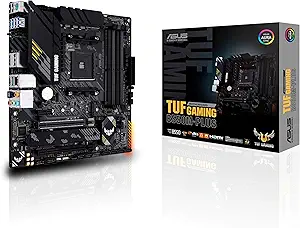
Do not buy it if you are starting a new build with no existing AM4 parts and expect to upgrade the processor later, since the socket is at the end of its life. Do not buy it if you need many expansion slots. Alternatives on the same socket include the ASUS TUF Gaming B550M-PLUS, the Gigabyte B550 Gaming X V2 and the ASRock B550M Steel Legend, while the cheaper MSI A520M-A PRO drops to PCIe 3.0. Our motherboards category covers the wider field.