Description
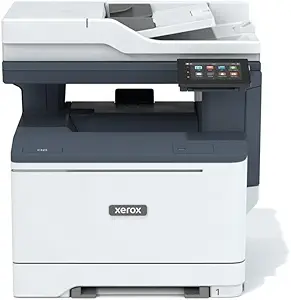
The Xerox C410DN is a color laser printer for small to midsize teams. The most important thing to establish first is what it is not: the Additional Printer functions field reads Print Only, and Xerox’s own description covers printing exclusively. There is no scanner, no copier and no fax in this machine, which puts it against print only workhorses rather than against all in one units.
Buyers who need scanning and copying in the same box should look at the Xerox C325 multifunction or the HP LaserJet Pro M477fnw. Those who want a monochrome print only machine at lower running cost can compare the Brother HL-L5000D.
Speed, Resolution And Paper Handling
Xerox rates the C410DN at up to 42 pages per minute on letter paper, with print resolution of 1200 by 1200 dpi in both color and black. A separate field describes the color output as 1200 by 1200 dpi with 4800 color quality, which is Xerox’s way of saying the engine applies enhancement above its native grid rather than genuinely resolving 4800 dpi.
Maximum input sheet capacity is listed at 550 across two trays, and duplex is automatic, so double sided documents need no manual intervention. Media support is broad for a laser machine, covering plain paper, card stock, envelopes, glossy photo paper and labels. Sheet sizes run from 3.9 by 5.8 inches up to 8.5 by 14 inches, which covers legal paper. Memory is listed at 64 MB, which is modest and may matter when queuing large color jobs.
Setup, Connectivity And Software
Xerox builds much of its pitch around ease of setup. The Easy Assist app runs on a phone and provides guided Wi-Fi setup, and Xerox states this reduces the need for IT involvement. The app also handles monitoring, file browsing and printing, printer status and toner level checks. A 4.3 inch touchscreen sits on the printer itself.
Standard connectivity is Ethernet and USB. Wi-Fi is described as optional throughout the listing, and Wi-Fi Direct is likewise listed as optional, so buyers who want wireless should confirm whether it is included in the specific package they order or requires an add on. Apple AirPrint and Mopria are supported for mobile printing, and the printer can print Microsoft Office files directly from a USB drive, which is a useful capability for walk up printing without a computer.
Xerox also bundles its own print drivers and the Xerox Print and Scan Experience utility, though the scan half of that name has nothing to act on with this model.
Environmental Credentials And Consumables
Xerox states the printer meets or exceeds ENERGY STAR and EPEAT standards, is made with up to 25 percent post consumer recycled plastic, and includes Earth Smart Printing features to reduce paper waste. The Green World Alliance program handles collection and recycling of spent imaging supplies. These are among the more concrete environmental claims in this catalog because they reference recognized third party standards rather than generic language.
The consumables position needs attention. The included components list reads: installation guide, power cord, pre installed starter capacity print cartridges, product safety sheet and quick use guide. Starter capacity cartridges hold less toner than full yield replacements, so a buyer should expect to purchase a full set of four color cartridges sooner than a running cost calculation based on standard yields would predict. The listing does not state the starter cartridge yields, nor does it say whether the imaging units and waste toner container are separate consumables on this model, which they commonly are on color lasers. Both should be checked before committing.
Highlights
- Up to 42 pages per minute in color and black at 1200 by 1200 dpi.
- 550 sheet maximum input capacity across two trays.
- Automatic two sided printing as standard.
- Ethernet and USB standard, Wi-Fi and Wi-Fi Direct listed as optional.
- 4.3 inch touchscreen with the Xerox Easy Assist mobile app.
- AirPrint and Mopria support, plus direct printing of Office files from USB.
- ENERGY STAR and EPEAT rated, with up to 25 percent recycled plastic content.
Things To Consider
The specification block for this listing describes a machine that does not exist. Scanner Type reads Flatbed, Max Copy Speed Black and White reads 42 ppm, and two separate copy resolution fields are populated, all on a printer the same listing correctly identifies as print only. Controller Type reads Android. Display Type reads LCD or LED or OLED, which is three answers where there should be one. Total Ethernet Ports reads 2 and Total USB Ports reads 4, neither of which matches a printer with one network port and one USB port. Anyone relying on this data sheet to plan a purchase will be misled, and Xerox’s own written description is the more reliable source on the same page.
Customer feedback is effectively nonexistent: one rating at 5.0 stars, and a Best Sellers Rank around 259,000 in Office Products. There is no peer evidence here at all, which for a business purchase of this size is a real gap.
Weight is the other practical point. At 47 pounds this is a substantial machine that needs a sturdy surface and two people to position, despite Xerox describing it as lightweight and compact in the marketing copy. Its footprint is 16.6 inches deep by 17.9 wide by 12.5 high. Readers comparing options can browse the wider laser printers category, and should also price the consumables in the toner cartridges category before deciding.
Who It Suits
The C410DN suits a small to midsize team that prints color documents in volume, does not need scanning or copying in the same device, values fast duplex output and a documented environmental profile, and has a wired network to plug into. Direct printing from a USB stick and the mobile setup app are genuine conveniences for offices without dedicated IT support.
It is the wrong purchase for anyone who needs an all in one, for buyers who require wireless as standard rather than as an option, for offices short on floor space given its size and weight, and for anyone who wants a body of customer feedback to draw on before spending.