



Description
What The UDM-SE Is
The Ubiquiti Dream Machine Special Edition, model UDM-SE, is a combined router, security gateway, network controller and PoE switch in a single rack width chassis. Ubiquiti describes it as an all in one router and security gateway that includes the full UniFi application suite for device management, which is the part that defines the product.
UniFi is an ecosystem rather than a single device. The controller software that normally runs on a separate server or cloud key is built into this unit, which means access points, cameras, switches and phones from the UniFi range can be adopted and managed from the same box that routes the traffic. That is why the UDM-SE is bought: not for raw speed, but for consolidation.
Ports, And Why The Layout Matters
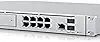
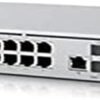
The port arrangement is the most concrete part of the specification and it is worth listing in full. On the LAN side there is one 10G SFP+ port and eight gigabit RJ45 ports, of which two are PoE+ and six are PoE. On the WAN side there is one 10G SFP+ port and one 2.5 GbE RJ45 port. Routing performance is quoted at 3.5 Gbps and above.
Power over Ethernet on eight ports is the practical feature here. It means access points, cameras and IP phones draw power from the network cable rather than needing a socket at each location, which removes most of the installation work in a small office or a house being wired properly. The distinction between PoE and PoE+ matters when planning: PoE+ carries more power, and higher draw devices such as some cameras and pan and tilt access points need those two ports rather than the six standard ones.
The dual WAN arrangement, with both a 10G SFP+ and a 2.5 GbE RJ45 input, allows either a fast fiber connection or a conventional modem feed, and on UniFi hardware a second WAN is typically used for failover. The listing does not describe failover behavior, so that should be confirmed in Ubiquiti’s documentation.
Storage And Display
A 128 GB solid state drive is included, and the chassis has a 3.5 inch drive bay. The listing states both facts without saying what the bay is for or whether a drive is supplied for it, so buyers should assume a drive is an additional purchase. A 1.3 inch touchscreen on the front provides status information and basic controls, which is more useful in a rack than it sounds, because it removes the need to open a browser to check whether the internet connection is up.
A Wireless Question That Needs Answering Before Buying
This is the most important thing to check on this listing. The specification table lists Wireless Type as 802.11ac, and the product sits in a wireless access points category. But nothing in Ubiquiti’s description mentions Wi-Fi at all. The description lists routing, the switch, the ports, the touchscreen and the storage, and stops there.
In the UniFi range, the Dream Machine family includes models with built in Wi-Fi and models without, where wireless is expected to come from separate access points managed by the same controller. Because this page describes no antennas, no wireless bands, no wireless throughput figures and no Wi-Fi standard beyond that one table field, a buyer should not assume the UDM-SE provides Wi-Fi on its own. Confirm it against Ubiquiti documentation, and budget for access points if it does not, since that changes the total cost of the project substantially. Outdoor coverage in particular needs a dedicated unit such as the TP-Link EAP225-Outdoor or a UniFi equivalent.
Highlights
- Router, security gateway and network controller in one unit.
- Full UniFi application suite included.
- Routing quoted at 3.5 Gbps and above.
- Eight port integrated switch with PoE on all eight.
- Two PoE+ ports for higher draw devices.
- 10G SFP+ on both LAN and WAN.
- 2.5 GbE RJ45 WAN port.
- 1.3 inch front touchscreen.
- 128 GB SSD included.
- 3.5 inch drive bay in the chassis.
Things To Consider
Beyond the wireless question above, this listing publishes almost nothing else. There is a single feature bullet reading Dream Machine Special Edition, all in one router and security gateway, and three product images. Power consumption, PoE power budget in watts, operating temperature, firmware details and warranty terms are all absent. The PoE budget in particular is a real planning number, because eight PoE ports do not mean eight devices at full draw, and this page does not state the total available.
- Whether the unit provides Wi-Fi itself is not established anywhere in the description.
- Total PoE power budget is not stated, which limits how many devices can be planned.
- SFP+ ports need transceiver modules or direct attach cables, which are separate purchases.
- No drive is included for the 3.5 inch bay.
- UniFi hardware assumes some networking knowledge to configure well.
- At 10.91 pounds and 17.4 inches wide this is rack oriented, not a shelf router.
- Only one feature bullet is published on the listing.
Who Should Buy It And Who Should Not
The UDM-SE suits someone building a properly wired network: a home with Ethernet in the walls, a small office, or a site with cameras and access points that all need power over the network cable. The consolidation is the point, since one device replaces a router, a switch, a PoE injector and a controller, and the UniFi interface manages the lot from one place. The 10G ports also give it a longer life than a consumer router as internet speeds rise.
It is the wrong purchase for someone who wants a single box that provides Wi-Fi out of the tin, which is exactly what a consumer router such as the ASUS RT-AX1800S or a modem router combination like the NETGEAR Nighthawk C7000 does. It is also more equipment than a small apartment needs, where a USB adapter such as the EDUP AX3000M plus a basic router solves the problem. Anyone chasing 10 gigabit throughput on a workstation should also budget for a network card such as the Mellanox ConnectX-4 Lx, and the wireless access points category covers the coverage side.
